
SELLER CONTROL CENTER

Dashboard Overview Guide

Learn what every section in Seller Central does and how to use the dashboard to manage products, orders, earnings and inventory.

This guide walks through the main dashboard widgets, left navigation, reports, charts and seller tools.

START HERE

What the Dashboard shows you

Your dashboard is the command center for your store. It tracks sales, orders, inventory, commissions and operational alerts.

Orders

Track open, completed, cancelled and rental returns.

Earnings

View net sales, commissions and payouts.

Inventory

Manage listings, stock and sync health.

Reports

Monitor performance and trends.

LEFT MENU GUIDE

What each menu item does

SCREEN 1

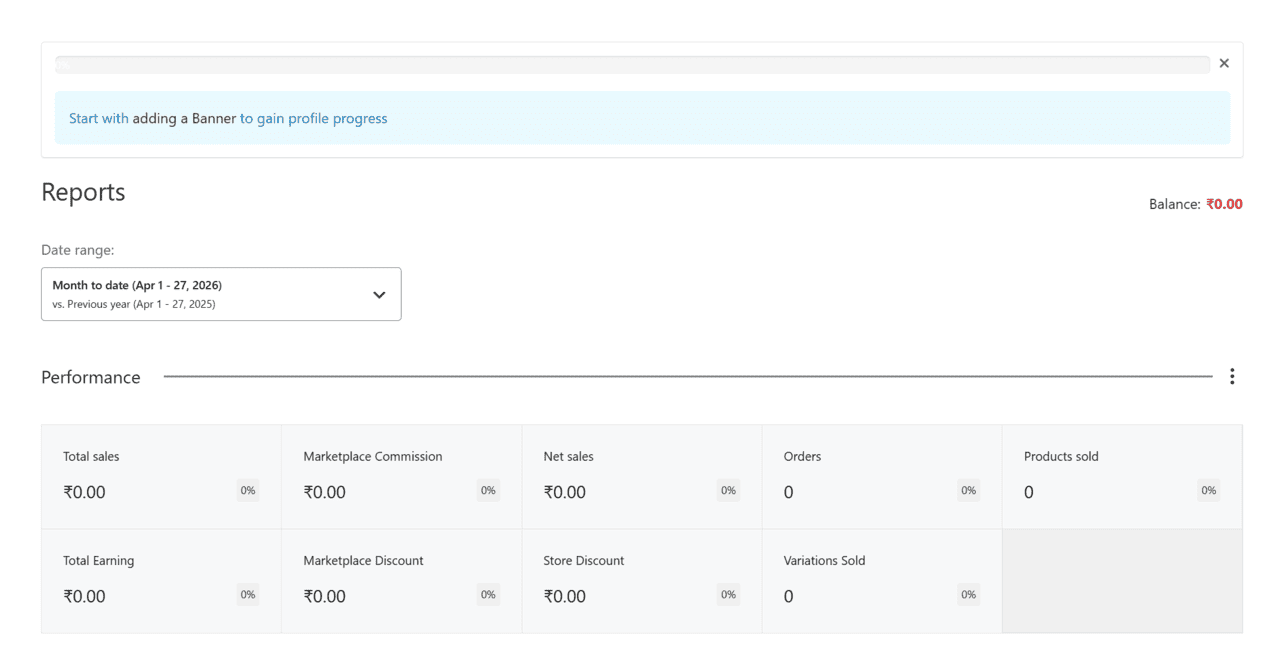
Performance Summary Widgets

  • Total sales
  • Marketplace commission
  • Net sales
  • Orders count
  • Products sold
  • Discount metrics

These top widgets give a quick financial and operational snapshot.

CHARTS & REPORTS

Understand your analytics

Use the date range selector and charts to monitor performance.

[/vc_column]

Net Sales Chart

Track revenue movement over time.

Orders Chart

See order volume trends.

Date Filters

Compare month, quarter and seasonal performance.

DAILY SELLER ROUTINE

Recommended dashboard workflow

1

Check alerts

2

Review orders

3

Check inventory

4

Review payouts

5

Monitor reports

QUICK LINKS

Jump to key seller areas

POWER USER TIPS

Use the dashboard like a pro

  • Check reports weekly, not only when something goes wrong.
  • Watch commissions and discounts, not just gross sales.
  • Use announcements for platform changes.
  • Review sync/inventory often if selling across multiple Vault channels.
  • Use dashboard first before contacting support—many answers are already visible there.
DASHBOARD FAQS

Common Questions

If you have no sales in the selected period or filters are narrow, charts may show no data.

Total sales is gross order value. Net sales reflects deductions such as commissions, discounts or adjustments.

Use Products in the left navigation to add or edit listings.

Use Reports and the Payout/Withdraw sections to track earnings.

SELLER CONTROL CENTER

Use the dashboard daily to run your business.

Products, orders, earnings and inventory all start here.